01provider.free-limit
Notice
The limit isn’t treated as a crash. Infinite takes the network lock and leaves the affected chats waiting, so nothing is lost mid-answer.
event → limitOpen source · Windows + Linux · v2.2.27
When OpenCode runs out of free messages, Infinite changes the exit IP, proves it on a throwaway chat, and resumes the same conversation. No visible continue. Nothing deleted.
Right where we left off. The retry guard is in place; the diff below is the part still open.
@@ src/auth/refresh.ts
-  await rotate(scope)
+  await rotate(scope, { retries: 2 })
if (!rotated.ok) return refresh()Session rotation is in. Want me to run the migration test now?
Illustration only. The real probe is a temporary session titled “IP probe”, deleted after the check.
Starting over is the expensive part. Infinite treats the limit as a network event, not an ending.
Every free tier eventually says no. When OpenCode reports provider.free-limit, the valuable part isn’t the last message — it’s everything behind it: the half-finished refactor, the migration you were reasoning through, the file that finally made sense.
So Infinite doesn’t open a new chat and ask you to paste the thread back in. It changes the exit, checks that the new route actually answers, and puts the same conversation back to work.
The sequence runs while the chat waits. The only thing you may notice is a red notice, and it disappears when the thread resumes.
The limit isn’t treated as a crash. Infinite takes the network lock and leaves the affected chats waiting, so nothing is lost mid-answer.
event → limitAuto tries WARP, then a direct connection. Or choose Tor, a proxy, SOCKS5, Route64, Mullvad or Windscribe. The route belongs to OpenCode.
egress → different exitA short message goes out on a temporary session titled “IP probe”. If the new IP answers, the probe is deleted. If it doesn’t, the next route is tried.
probe → sent, then deletedWaiting chats receive a hidden resume message. No visible continue, no new session to find, no history to paste back in.
The next exit is tried. 15 attempts by default, up to 50. Used IPs are remembered instead of handed straight back.
No exit can fix that. Infinite reports the failure instead of looping forever, and says which route failed.
Stop releases the network lock immediately. You don’t have to wait for a timeout.
Pick a route in the bottom bar, or let Auto decide. Every route is scoped to OpenCode; your browser doesn’t move.
Tries WARP first, then falls back to a direct connection. No installs, no prompts. The default for a reason.
Desktop Auto is WARP or direct. The launcher’s Auto picks the fastest installed of WARP, Tor or proxy. Windows-only VPN Gate also lives there.
PROXY ENV → OPENCODE TREE ONLY
The full OpenCode desktop app, with Infinite controls where the work happens. No terminal, no Cloudflare app, no extra setup.
Auto, None, and Advanced. Advanced opens every route in the bar without leaving the chat; the choice is remembered per computer.
What actually happened: the connection check, Fix connection, and Stop. Failures are shown, not dressed up as success.
A new IP without touching the conversation. Your chats and history stay exactly where they are.
After a limit, new exits are tried on a temporary chat. The first working IP wins; the waiting chats resume. 15 attempts by default.
Providers, themes, background image, text color, voice dictation, updates — and the full-detail log if you want the IPs and timings.
Also inside: automatic updates from this repository · a custom background image · composer tint · Win+H dictation. The installer is Windows-only.
DeepAI and OmniRoute behave like any other OpenCode provider. No separate Infinite window, no second model picker.
DeepAI opens a browser sign-in that returns to 127.0.0.1 and keeps the account key on this computer. OmniRoute takes a server URL and a key, then reads the model list from that server.
The installer ships provider definitions, never an account key. Nothing is shared from the repository.
Providers
127.0.0.1. Or enter a key by hand.
Login with DeepAI
The launcher carries the same rotation core, plus the terminal-first extras: VPN Gate, route64 / WireGuard, IP search and a portable configuration.
It finds your OpenCode, asks before installing anything, and leaves the real opencode command exactly where it was. The proxy is set for the OpenCode process tree only — your browser, downloads and the rest of the machine stay direct.
Tor is portable and reuses a running Tor Browser. Free proxy lists skip dead entries. Route64 brings your WireGuard config; VPN Gate is there too, on Windows, in an administrator window. Configuration is portable and the interface follows your system language.
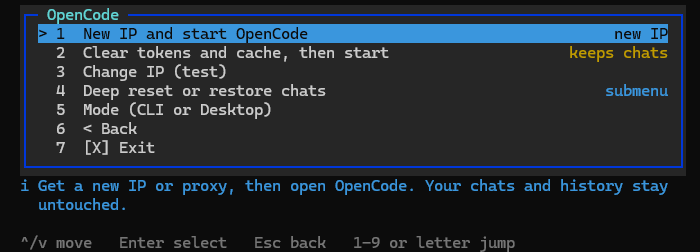
No installer, no service, no permanent proxy. Portable configuration lives with the launcher.
.bat and .sh. Windows 10/11, x64, arm64, with a limited 32-bit path.
VPN Gate joins the same exits — free proxies, SOCKS5, route64, Mullvad, Windscribe, WARP, Tor and None — plus IP search.
EN · TR · DE · ES · FR · IT · PT · RU, plus auto. Logs and the support report stay in English.
“Everything is user-mode. UAC is only needed if WARP has to be installed — and WARP is optional.”
Ten colorways in the terminal, and a desktop that takes a background image, text color and composer tint. The launcher reads extra themes from a text file.
Ocean, forest, sunset, mono and rainbow are built in. The launcher’s next five arrive from themes.txt: one line per theme, at most 30, invalid lines skipped. Pick one — the preview is HTML, not a screenshot.
# name|title|accent|border|selected|rainbow
# a line that does not match is skipped
oceani Accent colors of the interface. Every change is saved at once.
Built-in themes live in the launcher itself; extras come from the repository. Rainbow moves — watch the border.
Start with the desktop app. It is the easiest door: no terminal, no extra networking tools, no admin rights. The launcher is one file, and it also covers Linux.
v2.2.27 / 2.60.26The full OpenCode desktop, with the Infinite bar, providers and appearance settings built in.
WARP doesn’t need to be installed. The app brings its own tunnel and uses the Cloudflare client only when it is already there.
One file with the same rotation core and more exits. Windows and Linux. It asks before installing anything.
$d = [Environment]::GetFolderPath('Desktop')
$u = 'https://gitlab.com/jekooo/opencode-infinite/-/releases/permalink/latest/downloads/OpenCode-Infinite.bat'
iwr $u -UseBasicParsing -OutFile "$d\OpenCode Infinite.bat"
& "$d\OpenCode Infinite.bat"
Or download the .bat directly and double-click it.
dir=~/.local/share/opencode-infinite
mkdir -p "$dir"
curl -fsSL https://gitlab.com/jekooo/opencode-infinite/-/releases/permalink/latest/downloads/opencode-infinite.sh -o "$dir/opencode-infinite.sh"
bash "$dir/opencode-infinite.sh"
Or download the .sh directly. It is a script — read it first if you like.
Portable config. No permanent proxy. The real opencode command is never replaced.
If the limit follows your account, another exit cannot fix it. Infinite reports that instead of looping. It changes the network, not the rules.
Reset limit does not delete conversations. The only session removed is the temporary “IP probe”, and it never contains your work.
Compare SHA256SUMS. Never share opencode.json, auth.json or the WARP registration file: they contain keys.
No vague promises. These are the limits and details that matter before you install.
No. Infinite changes the network and, with Reset limit, the session tokens. Your conversations and history stay in place. The temporary “IP probe” chat is the only one removed, and it never contains your work.
No. A limit that follows the account cannot be fixed by another IP. Infinite stops and reports it instead of trying forever. It changes the network, not the rules of the service.
No. The desktop contains its own WARP tunnel and uses the Cloudflare client only when it is already there and answers. The launcher asks before installing anything.
No. In the desktop, only OpenCode uses the chosen route. In the launcher, the proxy variables are set for the OpenCode process tree — the TUI, resume and probe. The rest of the system stays direct.
A temporary chat titled “IP probe”. Infinite sends one short message through the running service to prove the new exit can answer. If it does, the probe is deleted and the waiting chat resumes. No fake success.
After a free limit, it tries new exits on a temporary chat, one by one. The default is 15 attempts, configurable between 15 and 50. The first one that answers resumes the waiting chats. Stop releases the network lock immediately.
The desktop installer is Windows. On Linux, use the launcher script: it carries the same rotation core and the extra networking modes.
ECONNREFUSED 127.0.0.1:40000?It is the old startup bug. Port 40000 belongs to WARP’s local proxy, not the OpenCode server. The fix is in desktop 2.2.28; the current published build is 2.2.27. Wait for 2.2.28 or newer, then restart. Deleting your database, service.json or chats is never necessary.
The repository’s LICENSE file is GPLv3 — the README still carries an older MIT line. OpenCode is a separate project with its own license and terms; DeepAI, OmniRoute and the VPN services are third parties too. Keys never ship with the installer.